
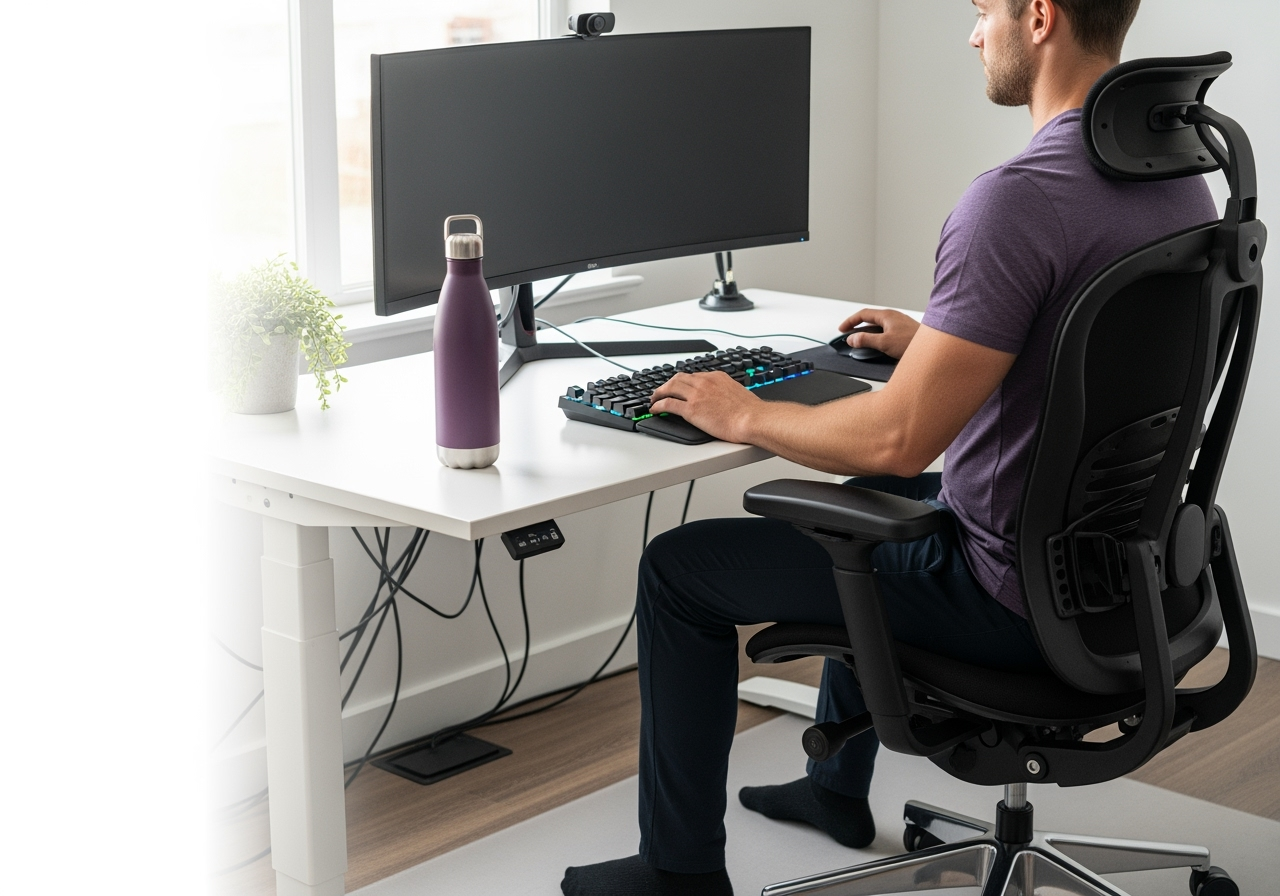
The Weekend Warrior’s Guide to a Pain‑Free Ergonomic Workstation
If you train hard on weekends but grind at a desk during the week, your workstation can either support recovery—or sabotage it. This step‑by‑step setup reduces neck, shoulder, and low‑back strain while keeping you ready for sport.
Contents
- Quick anatomy of desk pain
- 10‑minute workstation setup checklist
- Micro‑breaks and mobility plan
- Common mistakes (and easy fixes)
- Gear recommendations by budget
- When to get help
Quick anatomy of desk pain (why posture “habits” beat perfect posture)
- Neck/shoulders: Forward head + elevated shoulders = upper trap overload, headaches.
- Mid‑back: Rounded thoracic spine = stiff rotation for golf, hockey, pickleball.
- Low back/hips: Prolonged flexion = hip flexor tightness, inhibited glutes, achy lumbar. Key idea: Your “next posture is your best posture.” We aim for neutral setup + frequent, small position changes.
10‑minute workstation setup checklist
- Chair setup
- Seat height: Sit so knees and hips are level or hips slightly higher. Feet flat on floor.
- Seat depth: 2–3 fingers between the seat edge and the back of your calf.
- Lumbar support: Support the natural curve; if none, add a small cushion or rolled towel.
- Armrests: Height so shoulders relax (not shrugged). Elbows near 90–110° and close to body. Common fix: If your feet don’t reach the floor, use a footrest or a firm box.
- Monitor position
- Height: Top of the screen at eye level (or 1–2 inches below if you wear progressive lenses).
- Distance: About an arm’s length (50–70 cm). Move closer if you lean forward to read.
- Centering: Align the primary monitor with your nose; dual monitors used equally should be centered; if one is primary, center that one and angle the secondary.
- Keyboard and mouse
- Placement: Close to the body so elbows stay by your sides; forearms parallel to floor.
- Keyboard tilt: Flat or slightly negative tilt to avoid wrist extension.
- Mouse: Same height/plane as keyboard. Keep wrist neutral—move from shoulder, not just the wrist. Consider a larger mouse if you death‑grip a tiny one.
- Desk height
- Ideal: Around elbow height when shoulders are relaxed. For most, 25–30 inches; adjust to you, not the spec.
- Standing desk: Set the same elbow‑height rule. Keep screen height consistent with sitting.
- Laptop users
- Use a laptop stand to lift the screen to eye level + external keyboard/mouse. This is non‑negotiable for daily use.
- Lighting and glare
- Place monitor perpendicular to windows to reduce glare.
- Use a task light to keep the screen dimmer than your paper/keyboard.
- Cable and reach management
- Keep daily‑use items within the forearm “easy reach” zone.
- Move the phone/headset to the non‑mouse side to alternate load.
Micro‑breaks and mobility plan (2 minutes per hour)
- Timing: 30–60 seconds every 30 minutes; 2 minutes every hour. Set a timer or use software nudges.
- Movement snacks:
- Chin nods + retractions x10 (small, gentle)
- Shoulder blade slides: elbows at sides, squeeze down/back x10
- Thoracic extension over chair back x5 breaths
- Hip opener: stand, lunge stretch 30s/side
- Calf raises x15 or brisk walk to water
- Standing rotation drill for golfers/pickleball/hockey: hands across chest, slow trunk rotations x10 each way.
Common mistakes (and easy fixes)
- Perching on front of chair → Slide back and use lumbar support.
- Shrugged shoulders at the keyboard → Lower armrests/desk; bring keyboard closer.
- Monitor too low → Stack books or use a riser; stop craning the neck.
- Wrist resting on sharp desk edge → Add a soft desk mat; keep wrists neutral.
- All‑day standing → Alternate: sit 30–45 min, stand 15–20 min; change positions often.
Gear recommendations (good/better/best)
- Chair:
- Good: Any adjustable office chair + lumbar pillow
- Better: Branch Ergonomic/Autonomous Ergo
- Best: Herman Miller Aeron/Embody, Steelcase Leap
- Monitor riser/laptop stand:
- Good: Stacked books
- Better: Simple metal riser
- Best: Adjustable gas‑spring arm
- Keyboard/mouse:
- Good: Full‑size keyboard + mid‑sized mouse
- Better: Low‑profile keyboard + vertical mouse
- Best: Split ergonomic keyboard + trackball/vertical mouse
- Footrest: A stable box works; adjustable footrests add comfort.
FAQ
Q: What is the correct monitor height?
A: Top of screen at eye level; arm’s length away; adjust for progressive lenses.
Q: Is a standing desk better?
A: It’s a change tool, not a cure. Alternate positions and keep elbows at desk height.
Q: What if my feet don’t touch the floor?
A: Use a footrest to keep knees/hips level and reduce low‑back strain.
Q: Do I need an expensive chair?
A: Adjustability matters most. Add a lumbar roll before upgrading.
When to get help If you’re dealing with recurring neck/shoulder headaches, numbness/tingling, or stubborn low‑back pain, a targeted assessment can identify mobility or motor‑control gaps your setup can’t fix alone.
Ready for a personalized ergonomic tune‑up?
Book an assessment with Nobility Chiropractic & Wellness in Smiths Falls. Online booking via Jane, or call/text 343.801.0094.